Split Bill View
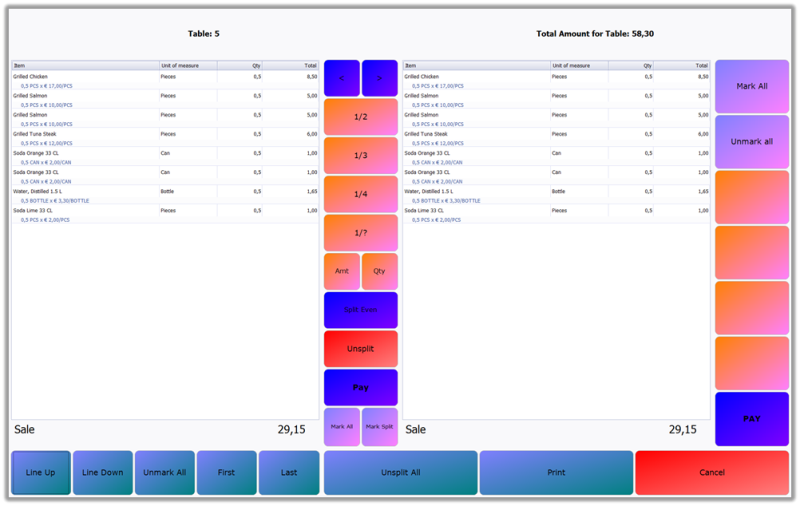
This is a split bill payment where all of the items have been selected with button Mark All and the button ½ has been selected to split the bill in half. The new totals for each bill are displayed as 29,15. The columns correspond to the view that they are to the right of. This can be set as a permission, so only managers, for example can perform split bill payments.
How to split
To split a bill item by item, highlight the item lines you want to pay and select the > button.
To split a bill evenly, select Mark All and one of the quick buttons ½, for example. Or select Split Even and choose by how many payments you want to split the bill. One part of the payment will appear in the right side of the screen.
How to pay
Select Pay in the right column and you are taken back to the Order View to enter the payment.
If you want to pay for the items in the left part of the screen, select the Pay button in the middle column.
Once you have entered the payment, the view automatically goes back to the Split Bill.
Other actions
To select a split part of the bill, select any item and click on button Mark Split then > button.
You can unsplit the bill with the Unsplit All button. If part of the bill has already been paid for, the item line will show the percentage of the item still left to pay on the item line in blue.

